Configure on commad-line by edit configuration file (Permanently)
- Open Terminal.
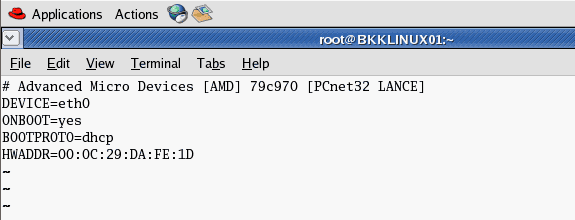
- Open network configuration file. In this example, it’ll configure on interface eth0. Type
vi /etc/sysconfig/network-scripts/ifcfg-eth0
- The current configuration is DHCP.
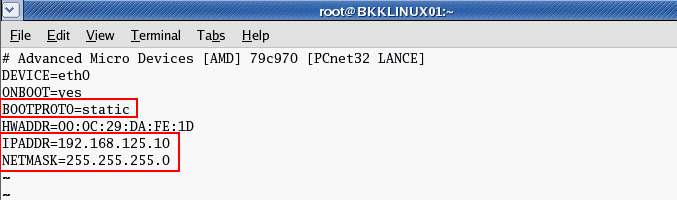
- Modify the file by press ‘i’ to enter insert mode. Change BOOTPROTO to static and add IP Address and Net mask as new lines if they’re not existed yet..
BOOTPROTO=static
Save the configuration file by press ESC + ‘:’ and type ‘wq’ to write and quit the editor.
IPADDR=192.168.125.10
NETMASK=255.255.255.0
- You can added these configuration to the config file. Replace [number] with your actual value.
GATEWAY=[number]
TYPE=Ethernet
NETWORK=[number]
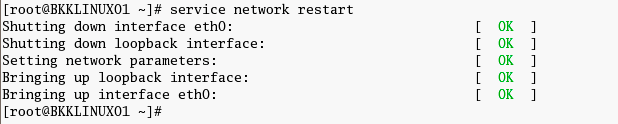
BROADCAST=[number] - Restart the network interface card. Type
service network restart
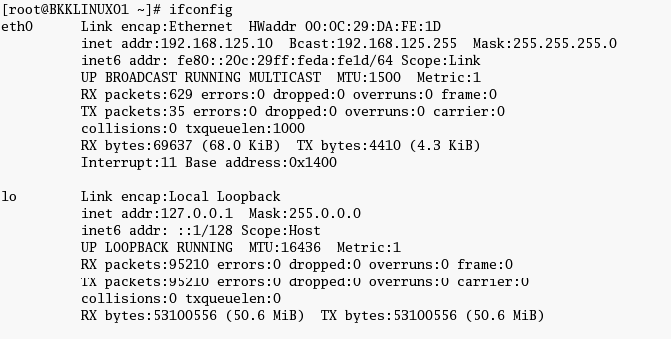
- Review the configuration. Type
ifconfig
. The IP Address has been changed permanently.

source - http://www.linglom.com/2008/04/20/how-to-change-ip-address-on-linux-redhat/

No comments:
Post a Comment